Papago vs Google Translate for Korean travel is not really a question of choosing one app and deleting the other.
Both are useful in South Korea, but they can feel different depending on whether you are translating a menu, reading a sign, having a conversation, checking pronunciation, or traveling without a reliable internet connection.
For many visitors, the most practical setup is to install both and use each one where it feels strongest. Papago vs Google Translate for Korean travel is therefore less about choosing a winner and more about knowing which tool fits each situation.
Papago vs Google Translate for Korean travel: the quick answer
Papago is especially useful when Korean is the main language you are dealing with and you want a translation tool built around East Asian language use.
Google Translate is useful when you need broad language coverage, strong offline support, camera translation, and a translation app you may already use in other countries.
You do not need to choose only one.
What Papago offers
NAVER Papago provides several translation modes through its official service.
These include:
- Text translation
- Image translation
- Voice translation
- Document translation
- Website translation
- Pronunciation playback
Papago also provides pronunciation-reading support for Korean so users can see how Korean text is pronounced using English letters.
What Google Translate offers
Google Translate also provides several useful travel features.
Google’s official help documentation includes:
- Text translation
- Camera translation
- Image translation
- Conversation translation
- Offline language downloads
- Saved phrases and translation history
For international travelers who already use Google Translate elsewhere, this familiarity can be useful.
Which app is better for Korean menus?
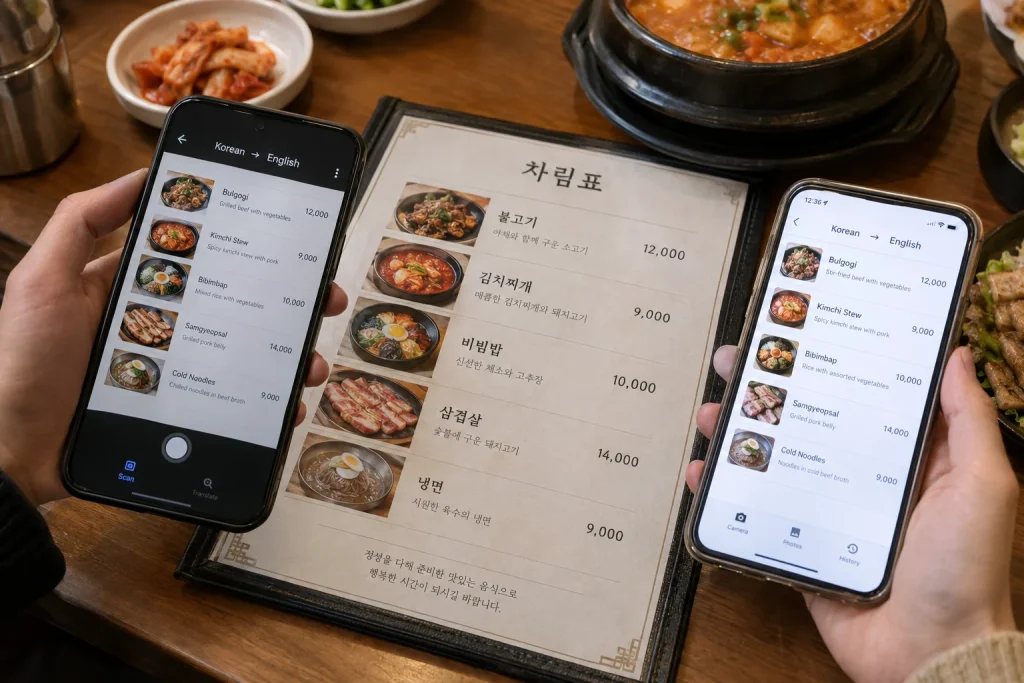
Both apps can translate text captured through a phone camera.
This is useful for restaurant menus, signs, notices, product labels, and instructions.
Papago is particularly convenient when most of the text you encounter is Korean and you want a Korea-focused translation workflow.
Google Translate can be useful when the menu contains several languages or when you want to use the same app across multiple countries.
Camera translation is one of the most useful travel features
You do not need to type every Korean word manually.
With camera translation, point the phone at printed text and let the app recognize and translate it.
Google officially supports camera translation, including offline camera translation for supported downloaded languages.
Papago also provides image translation as one of its core translation modes.
Which app is better for signs and notices?
For short Korean signs, warnings, menus, posters, and notices, either app can work well.
The quality of the result often depends on:
- Lighting
- Text clarity
- Font style
- Camera angle
- Whether the Korean sentence contains slang or context-dependent language
When a translation looks strange, compare the result in the second app rather than assuming the first result is correct.
Why comparing translations is useful
Machine translation is not perfect.
A Korean phrase can have several meanings depending on context, politeness level, omitted subjects, or local usage.
If a translation affects something important such as:
- A food allergy
- A medical instruction
- A transportation notice
- A reservation condition
- A payment rule
checking both Papago and Google Translate can provide useful confirmation.
Papago pronunciation tools are useful for Korean travel
Papago allows users to listen to translated text and adjust playback behavior.
Its settings also include pronunciation reading for Korean, which can display Korean pronunciation using English letters.
This can help when you want to attempt a simple Korean phrase yourself instead of only showing the phone screen.
Audio playback can be easier than pronunciation
You do not need to pronounce every Korean phrase correctly.
In a taxi, restaurant, hotel, or shop, it may be easier to let the translation app play the Korean sentence aloud.
Keep the sentence short and direct so the translation is easier to understand.
Conversation translation can help with simple exchanges
Google Translate includes conversation translation designed for two people speaking different languages.
Papago also provides voice-based translation features useful for face-to-face communication.
These tools work best for short practical conversations rather than long discussions.
Examples include:
- “Is this spicy?”
- “Does this contain peanuts?”
- “Where is Exit 4?”
- “Can I pay by card?”
- “Please take me to this address.”
Keep sentences simple
Translation apps usually perform better when you use clear, direct language.
Avoid long sentences with multiple conditions or idioms.
Instead of saying:
“I was wondering whether there might possibly be another entrance that is closer to the hotel.”
use:
“Which entrance is closest to this hotel?”
Google Translate is strong for offline use
Google officially allows users to download supported languages for offline translation.
After downloading a language pack, text translation can work without an internet connection.
For supported languages, camera translation can also work offline.
This is valuable if your travel SIM is not active yet or your mobile data connection becomes unreliable.
Download Korean before your flight
If you plan to use Google Translate offline, download the Korean language pack before leaving home.
Google recommends downloading languages while connected to Wi-Fi.
This avoids wasting travel data and gives you a backup translation option immediately after landing.
Do not depend only on airport Wi-Fi
Public Wi-Fi is widely available in South Korea, but translation is most useful when you need it unexpectedly.
A menu, taxi conversation, pharmacy instruction, or street notice may appear when you are away from reliable Wi-Fi.
Having offline translation available is a useful backup.
Papago is deeply connected to Korean language use
Papago is developed by NAVER, one of South Korea’s major internet platforms.
The service supports Korean along with English, Japanese, Chinese, and a growing group of other languages.
For a Korea-focused trip, many travelers find it useful to keep Papago available specifically for Korean-language situations.
Google Translate offers broader travel continuity
Google Translate is useful beyond South Korea.
If your trip includes Japan, Southeast Asia, Europe, or other destinations, the same app can continue to support many languages.
This makes it convenient for multi-country travel.
Which app is better for Korean restaurant menus?
Start with whichever camera interface you find easier.
If the result is confusing, try the second app.
Food words can be especially difficult because Korean menus may use:
- Abbreviated dish names
- Regional names
- Cooking terms
- Brand names
- Ingredients that have no simple English equivalent
A second translation result can provide useful context.
Translation apps cannot identify every ingredient safely
If you have a severe food allergy, do not rely on machine translation alone.
Show a clearly written allergy statement, confirm directly with staff, and use professional or official assistance when the risk is serious.
Translation apps are useful communication tools, not guarantees of medical or allergy safety.
Which app is better for taxi travel?
For taxi travel, the destination itself is usually more important than conversational translation.
A Korean place name, address, or map pin can communicate the destination more reliably than a long translated explanation.
Translation becomes useful when you need to clarify an entrance, payment method, waiting time, or another specific detail.
Which app is better for shopping?
Camera translation is particularly useful for:
- Product labels
- Cosmetic instructions
- Food packaging
- Promotional signs
- Return or exchange notices
For important purchase conditions, check the translated meaning carefully rather than relying only on one phrase recognized by the camera.
Handwriting and stylized fonts can be difficult
Translation quality may drop when the source text is difficult for the camera to recognize.
Handwritten menus, decorative signs, curved packaging, glare, and low-light photos can all reduce accuracy.
If possible:
- Move closer to the text.
- Hold the camera straight.
- Improve the lighting.
- Capture only the relevant section.
- Try both translation apps.
Save important phrases before you need them
Travel becomes easier when you prepare a few phrases in advance.
Useful examples include:
- Hotel name and address
- Food allergy statement
- “Please stop here.”
- “I will pay by card.”
- “Where is the restroom?”
- “Which subway exit should I use?”
Store them in a note or translation phrasebook so you can access them quickly.
Do not translate names unnecessarily
For hotels, restaurants, subway stations, and addresses, the original Korean name is often more useful than a translated English phrase.
Keep both versions whenever possible.
A driver or local employee can usually identify the original Korean place name more easily.
Papago vs Google Translate for Korean travel: which should you install?
For most visitors, install both. In practical use, Papago vs Google Translate for Korean travel works best as a two-app strategy rather than an either-or decision.
They take little effort to keep on your phone and give you a useful backup when one translation looks unnatural.
A practical setup is:
- Use Papago frequently for Korean-specific text and pronunciation.
- Use Google Translate for offline backup and broader language coverage.
- Use camera translation for menus and signs.
- Compare both apps when an important translation seems unclear.
Do you need internet for translation?
Some features work best online, while others can work offline depending on the app and language package.
Google officially supports downloaded offline languages and offline camera translation for supported languages.
Before traveling, test your offline setup by temporarily disabling Wi-Fi and mobile data.
Bottom line
Papago vs Google Translate for Korean travel does not need a single winner.
Papago is a useful Korea-focused translation tool with text, image, voice, pronunciation, and other translation features.
Google Translate provides familiar multilingual tools, including downloadable offline translation and camera support.
Install both, keep Korean available offline when possible, and compare translations whenever the meaning is important.
Related BestSpot Guides
- essential apps for South Korea travel
- how to use Korean taxis without speaking Korean
- Naver Map vs KakaoMap vs Google Maps in Korea
Sources
- NAVER Papago — Official Translation Service
- NAVER Papago — Document and Translation Features
- NAVER Papago — Pronunciation and Audio Settings
- Google Translate Help — Offline Language Downloads
- Google Translate Help — Camera Translation
- Google Translate Help — Translation Features and Tips
Updated: September 2026. Translation features, supported languages, offline availability, and app interfaces can change over time.